
Westpac Genie1.1.0 - App Store
You'll be able to see results in few seconds.
Publisher Description

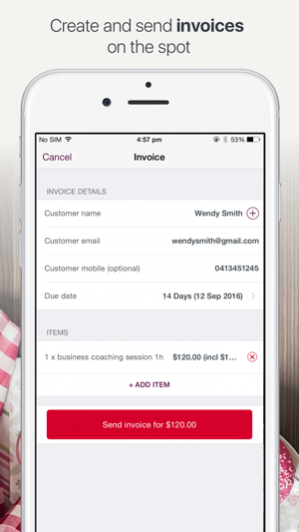

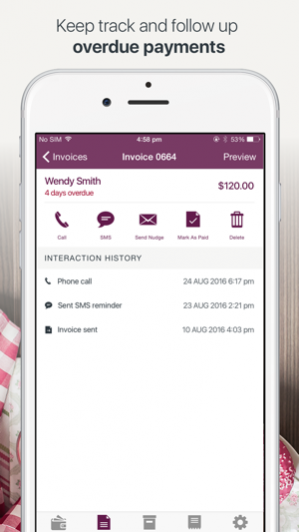
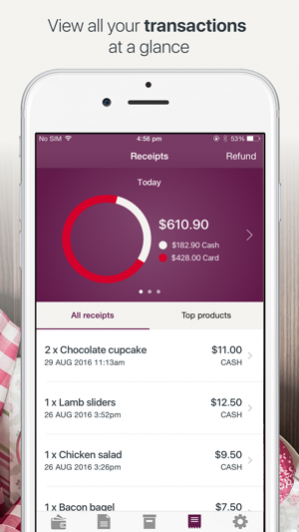
Getting paid just got easier with the Westpac Genie iPhone App. Take credit and debit card payments with our secure Bluetooth® card reader, send invoices, view receipts and manage your business from your pocket, anywhere, anytime. With Westpac’s Genie, you can;
- Take cash, credit and debit card payments
- Process refunds
- Send receipts via email
- Create invoices
- Track incoming payments
- Easily follow-up outstanding payments
- Manage your products and services
- See your top selling products
Genie syncs across your devices and has a convenient web portal so you can work when and where you want.
Credit and debit card payments will settle into your Westpac bank account daily, 7 days a week, 365 days a year.
How much does it cost?
Genie requires an approved Westpac Merchant Facility to operate. Our simple application process means you are setup with everything you need to start taking payments, including your Genie account, secure card reader and Business One transaction account.
• If keeping your costs predictable is important to you, choose one of our plans with an included monthly transaction value.
• If you’d rather Pay As You Go, our PAYG option charges you a flat rate of 1.95% for accepted card payments plus an upfront fee of $100 for your card reader.
We’re here to help, provide technical support or answer any questions you might have 24/7 on 1800 029 749.
Find out more:
Website: www.westpac.com.au/genie
Phone: 1800 029 749
Requires iOS 8.0 or later. This app is optimised for iPhone 6.
Things you should know:
Applications for Genie are subject to approval. Terms and conditions, fees and charges apply. Full details are available on request. This service is only available for Westpac Australia customers. Internet connection is required to use Genie. Normal mobile data charges apply. The Bluetooth® word mark is a registered trademark owned by Bluetooth SIG, Inc. and any use of such mark by Westpac is under license. Westpac Banking Corporation ABN 33 007 457 141 AFSL and Australian credit licence 233714.
Oct 16, 2016 Version 1.1.0
•Product name – our product name was formerly known as MPOS 1 and is now known as Genie.
•Bug fixes and performance improvements
•Improved card reader pairing
About Westpac Genie
The company that develops Westpac Genie is Westpac Banking Corporation. The latest version released by its developer is 1.1.0.
To install Westpac Genie on your iOS device, just click the green Continue To App button above to start the installation process. The app is listed on our website since 2016-10-16 and was downloaded 0 times. We have already checked if the download link is safe, however for your own protection we recommend that you scan the downloaded app with your antivirus. Your antivirus may detect the Westpac Genie as malware if the download link is broken.
How to install Westpac Genie on your iOS device:
- Click on the Continue To App button on our website. This will redirect you to the App Store.
- Once the Westpac Genie is shown in the iTunes listing of your iOS device, you can start its download and installation. Tap on the GET button to the right of the app to start downloading it.
- If you are not logged-in the iOS appstore app, you'll be prompted for your your Apple ID and/or password.
- After Westpac Genie is downloaded, you'll see an INSTALL button to the right. Tap on it to start the actual installation of the iOS app.
- Once installation is finished you can tap on the OPEN button to start it. Its icon will also be added to your device home screen.
Program Details
System requirements
Download information
Pricing
Version History
version 1.1.0
posted on 2016-10-16
Oct 16, 2016 Version 1.1.0
•Product name – our product name was formerly known as MPOS 1 and is now known as Genie.
•Bug fixes and performance improvements
•Improved card reader pairing
version 1.1.0
posted on 2016-10-16
16 Oct 2016 Version 1.1.0
•Product name – our product name was formerly known as MPOS 1 and is now known as Genie.
•Bug fixes and performance improvements
•Improved card reader pairing
version 1.1.0
posted on 2016-09-26
version 1.1.0
posted on 1970-01-01
2016年10月16日 Version 1.1.0
•Product name – our product name was formerly known as MPOS 1 and is now known as Genie.
•Bug fixes and performance improvements
•Improved card reader pairing
Disclaimer
Official App Store Link
We do not host Westpac Genie on our servers. We did not scan it for viruses, adware, spyware or other type of malware. This app is hosted by Apple and passed their terms and conditions to be listed there. We recommend caution when installing it.
The App Store link for Westpac Genie is provided to you by apps112.com without any warranties, representations or guarantees of any kind, so access it at your own risk.
If you have questions regarding this particular app contact the publisher directly. For questions about the functionalities of apps112.com contact us.
